| AUSTRALIA'S ORIGINAL AND BEST CAMP OVEN AND OUTDOOR COOKING CAMPING AND LIFESTYLE FORUM | |
|
https://www.aussiecampovenforum.com/cgi-bin/yabb2/YaBB.pl
General Chat Area >> Let's Chew The Fat >> Forum Integration - Facebook & Twitter https://www.aussiecampovenforum.com/cgi-bin/yabb2/YaBB.pl?num=1346736570 Message started by Derek on Sep 4th, 2012 at 3:29pm |
|
|
Title: Forum Integration - Facebook & Twitter Post by Derek on Sep 4th, 2012 at 3:29pm
As many of you would know Facebook and Twitter are significant social media sites where people share all sorts of information. My COCIA Facebook page is an example.
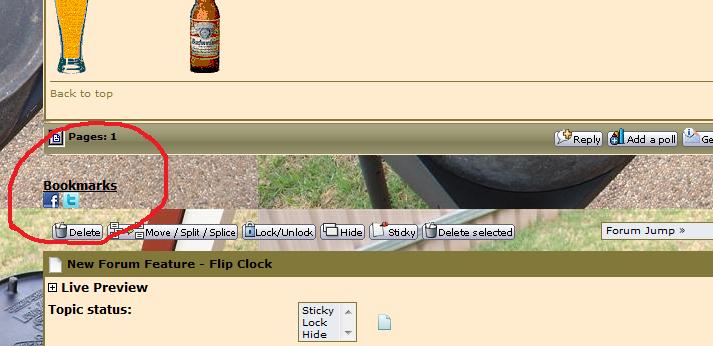
To bring our forum up to modernization I have integrated both Facebook and Twitter into the forum to allow you to share threads on both Facebook and Twitter At the end of every thread under Bookmarks you will see the Facebook and Twitter Logos. Click on the one you want to share, fill in the details and share it to your account. See pic below of detail. Cheers and enjoy. Derek [smiley=chef.gif] |
|
Title: Re: Forum Integration - Facebook & Twitter Post by Derek on Sep 4th, 2012 at 4:13pm
Have enlarged the icons to make them stand out more :)
|
|
Title: Re: Forum Integration - Facebook & Twitter Post by Derek on Sep 5th, 2012 at 1:17am
Have moved them into the bottom bar. Still playing cause they ain't sitting right >:(
|
|
Title: Re: Forum Integration - Facebook & Twitter Post by Derek on Sep 7th, 2012 at 4:10pm
Have slightly moved and changed the Icons. Just remember you need a Facebook and/or Twitter login to use this feature.
Cheers Derek |
|
Title: Re: Forum Integration - Facebook & Twitter Post by Carolyn™ on Sep 8th, 2012 at 9:49am
I just retweeted "There was movement".
The whole thread came up. I really only wanted the poem post not all the replies. I guess thats not possible? |
|
Title: Re: Forum Integration - Facebook & Twitter Post by Derek on Sep 8th, 2012 at 4:33pm
This is just really designed to give a link back to the forum.
No it isn't as it collects the whole thread URL. If you want to just use one post click on the icon beside the post number for it and get the URL that way. For example the URL to your post above is http://www.aussiecampovenforum.com/cgi-bin/yabb2/YaBB.pl?num=1346736570/4#4 You will notice the numbers 4#4 at the end of the URL. I don't use Twitter, being a big enough twit as it is, so do not know how it works. :) Cheers Derek |
|
AUSTRALIA'S ORIGINAL AND BEST CAMP OVEN AND OUTDOOR COOKING CAMPING AND LIFESTYLE FORUM Powered by YaBB 2.5 AE! YaBB Forum Software © 2000-2026. All Rights Reserved. |